GPT-6 Intelligent UI: आर्किटेक्चर, रियल-टाइम इंटरेक्टिव वर्कफ़्लोज़ और कम्प्लीट इम्प्लीमेंटेशन ब्लूप्रिंट
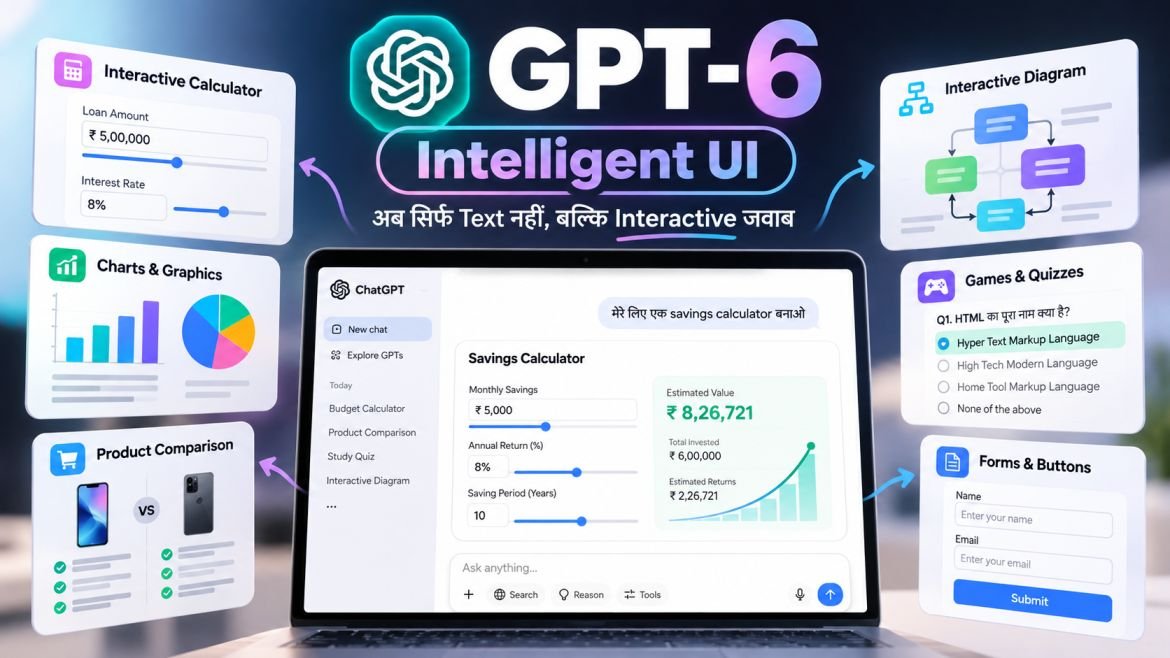
ChatGPT में अब आपको हर सवाल का जवाब सिर्फ text में नहीं मिलेगा। OpenAI ने GPT-6 के साथ Intelligent UI नाम का नया feature पेश किया है, GPT-6 Intelligent UI जिसकी मदद से ChatGPT text, images, charts, buttons, forms और interactive tools के जरिए जवाब दे सकता है।
उदाहरण के लिए, अगर आप ChatGPT से savings calculator बनाने के लिए कहते हैं, तो आपको सिर्फ एक formula या लंबा जवाब मिलने के बजाय ऐसा interactive tool मिल सकता है जिसमें आप अपनी monthly savings और समय बदलकर result देख सकें।
इसी तरह, आप किसी topic को समझने के लिए interactive diagram, दो products की तुलना के लिए side-by-side layout या दोस्तों के बीच खर्च बांटने के लिए bill splitter बना सकते हैं।
इसका सबसे बड़ा फायदा यह है कि आपको हर छोटे काम के लिए अलग-अलग website या calculator खोलने की जरूरत कम हो सकती है।
इस article में हम आसान भाषा में जानेंगे कि GPT-6 Intelligent UI क्या है, यह कैसे काम करता है, इसके features क्या हैं, इसे कैसे इस्तेमाल करें और इससे students, developers, bloggers और business owners को क्या फायदा हो सकता है।
GPT-6 Intelligent UI क्या है?
GPT-6 Intelligent UI, ChatGPT का ऐसा feature है जो आपके सवाल के हिसाब से जवाब का layout बदल सकता है।
पहले आप कोई सवाल पूछते थे और ChatGPT आमतौर पर text, bullet points, tables या code के रूप में जवाब देता था। अब GPT-6 जरूरत के अनुसार जवाब में interactive elements भी जोड़ सकता है।
उदाहरण के लिए, आप पूछते हैं:
“मुझे हर महीने ₹5,000 की savings का हिसाब लगाकर बताओ कि 10 साल में कितने पैसे जमा होंगे।”
ChatGPT आपको सिर्फ calculation बताने के बजाय एक savings calculator जैसा interactive experience दे सकता है। इसमें आप monthly savings या समय बदलकर अलग-अलग results देख सकते हैं।
इसी तरह, Intelligent UI का इस्तेमाल कई कामों में किया जा सकता है:
- Interactive Calculator: अपनी जरूरत के अनुसार numbers बदलकर calculation करना।
- Charts and Graphics: जानकारी को visual form में समझना।
- Interactive Diagrams: किसी topic के अलग-अलग हिस्सों को समझना।
- Product Comparison: दो या ज्यादा products की तुलना करना।
- Forms and Buttons: जवाब के अंदर उपलब्ध options का इस्तेमाल करना।
- Games and Quizzes: ChatGPT की बातचीत में छोटे games या quizzes खेलना।
OpenAI के अनुसार, GPT-6 खुद तय कर सकता है कि किसी सवाल का जवाब text में देना बेहतर होगा या उसमें visuals और interactive elements जोड़ने चाहिए।
इसलिए हर सवाल पर graphics या buttons दिखाई देना जरूरी नहीं है। अगर साधारण text से काम हो सकता है, तो ChatGPT text में भी जवाब दे सकता है।
Official announcement: GPT-6 and Intelligent UI for everyone
Intelligent UI कैसे काम करता है?
Intelligent UI के पीछे का idea काफी आसान है। आप ChatGPT को बताते हैं कि आपको क्या करना है और GPT-6 उस काम के लिए सही तरह का जवाब तैयार करने की कोशिश करता है।
OpenAI के अनुसार, इसके लिए एक native component library और compiler का इस्तेमाल किया जाता है। इससे model द्वारा interface तैयार किए जाने के दौरान उसके कुछ हिस्से पहले ही दिखाई दे सकते हैं।
इसका आसान workflow कुछ ऐसा है:
Step 1: आप सवाल पूछते हैं।
उदाहरण: “मेरे monthly expenses के लिए एक budget calculator बनाओ।”
Step 2: GPT-6 सवाल को समझता है।
यह तय करता है कि आपके काम के लिए कौन-सी जानकारी, layout और interaction उपयोगी होंगे।
Step 3: Interface तैयार होता है।
जवाब में text के साथ input fields, charts, buttons या दूसरे interactive elements दिखाई दे सकते हैं।
Step 4: आप result के साथ काम करते हैं।
अगर calculator में input बदलने की सुविधा है, तो आप अलग-अलग numbers डालकर result देख सकते हैं।
Intelligent UI का आसान Architecture
User Prompt
    |
    v
GPT-6 Model
    |
    v
Content + Layout Selection
    |
    v
Native UI Components
    |
    v
Compiler Processes the Interface
    |
    v
Interactive Response in ChatGPT
यह Intelligent UI को समझने के लिए एक simplified diagram है। OpenAI ने अपने public documentation में इसके सभी internal protocols और source code की पूरी जानकारी नहीं दी है।
इसलिए इसे किसी खास React engine, JSON protocol या custom API का technical specification नहीं समझना चाहिए।
क्या हर interaction के लिए AI से दोबारा सवाल पूछना पड़ेगा?
जरूरी नहीं।
अगर कोई calculator या interactive tool अपने input के आधार पर result बदल सकता है, तो हर बार नया prompt लिखने की जरूरत नहीं होगी।
लेकिन अगर आपको नया analysis, updated information या कोई complex task पूरा करना है, तो ChatGPT को दोबारा instruction देना पड़ सकता है।
GPT-6 Sol और Luna में क्या अंतर है?
OpenAI के अनुसार, ChatGPT में GPT-6 के अलग-अलग model variants अलग plans में उपलब्ध हैं।
| ChatGPT Plan | Model | Intelligent UI |
|---|---|---|
| Free | GPT-6 Luna | Available |
| Go | GPT-6 Luna | Available |
| Plus | GPT-6 Sol | Available |
| Pro | GPT-6 Sol | Available |
| Business | GPT-6 Sol | Available |
| Enterprise | GPT-6 Sol | Available, workspace settings के अनुसार |
Enterprise accounts में feature की availability admin settings पर निर्भर कर सकती है।
एक जरूरी बात: GPT-6 Pro plan और GPT-6 Pro reasoning option एक ही चीज नहीं हैं।
ChatGPT Pro plan में GPT-6 Sol इस्तेमाल किया जा सकता है, लेकिन GPT-6 Astra पर आधारित अलग Pro reasoning option Intelligent UI को support नहीं करता।
इसलिए अगर आपके ChatGPT में Intelligent UI दिखाई नहीं दे रहा है, तो model selector और reasoning settings को check करें।
Official information:
GPT-6 Intelligent UI के मुख्य Features
1 Interactive Calculators
मान लीजिए, आपको loan EMI या monthly savings का हिसाब लगाना है।
आप ChatGPT से ऐसा calculator बनाने के लिए कह सकते हैं जिसमें रकम, interest rate और अवधि बदलने के options हों।
इससे आपको हर बार नया सवाल लिखकर calculation कराने की जरूरत कम हो सकती है।
ध्यान रखें कि calculator का result उसके formula और input पर निर्भर करेगा। Financial decisions लेने से पहले calculation को verify करना जरूरी है।
2 Visual Answers और Charts
कुछ जानकारी text की तुलना में charts या graphics से जल्दी समझ आती है।
उदाहरण के लिए:
- Monthly expenses का breakdown।
- अलग-अलग products की तुलना।
- किसी process का step-by-step diagram।
- उपलब्ध data के आधार पर sales chart।
अगर आपको charts के बारे में अधिक जानकारी चाहिए, तो ChatGPT से उन्हें बनाने और समझाने के लिए कह सकते हैं।
3 Interactive Diagrams
किसी मुश्किल topic को समझने के लिए diagram काफी उपयोगी हो सकता है।
उदाहरण के लिए, आप ChatGPT से computer network, bicycle के gears या किसी scientific concept को visual तरीके से समझाने के लिए कह सकते हैं।
कुछ interactive experiences में अलग-अलग हिस्सों को select करके उनके बारे में जानकारी देखना भी संभव हो सकता है।
4 Product Comparison
अगर आप दो smartphones, laptops या दूसरे products की तुलना करना चाहते हैं, तो ChatGPT से side-by-side comparison मांग सकते हैं।
इसमें price, battery, camera, performance और दूसरे जरूरी features दिखाए जा सकते हैं।
हालांकि, product specifications की accuracy के लिए official sources से जानकारी verify करना बेहतर है।
5 Games और Quizzes
ChatGPT से छोटे games या interactive quizzes बनाने के लिए भी कहा जा सकता है।
उदाहरण:
- HTML और CSS का quiz।
- General knowledge questions।
- Language learning practice।
- Simple puzzle game।
यह feature students और उन लोगों के लिए उपयोगी हो सकता है जो पढ़ाई को ज्यादा interactive बनाना चाहते हैं।
ChatGPT में Intelligent UI कैसे इस्तेमाल करें?
Intelligent UI इस्तेमाल करने के लिए आपको programming सीखने या कोई अलग software install करने की जरूरत नहीं है।
आप ChatGPT में सामान्य भाषा में अपनी जरूरत बता सकते हैं।
Step-by-Step Guide
Step 1: ChatGPT खोलें
अपने browser में ChatGPT.com खोलें और अपने account में login करें।
Step 2: Model check करें
Model selector में देखें कि आपके account में GPT-6 का कौन-सा model उपलब्ध है।
Step 3: अपना prompt लिखें
उदाहरण के लिए:
“मेरे monthly expenses के लिए एक interactive budget calculator बनाओ। इसमें income, rent, food, electricity और travel expenses के input fields हों।”
Step 4: Interactive response का इस्तेमाल करें
अगर ChatGPT calculator, buttons, charts या दूसरे controls दिखाता है, तो उनका इस्तेमाल करके result देखें।
Step 5: जरूरत के अनुसार बदलाव मांगें
आप कह सकते हैं:
- “इसमें savings का chart भी जोड़ो।”
- “सभी amounts भारतीय रुपये में दिखाओ।”
- “इसका layout आसान बनाओ।”
- “Calculation का formula भी समझाओ।”
हर prompt पर interactive UI बनना जरूरी नहीं है, लेकिन स्पष्ट instructions से मनचाहा output मिलने की संभावना बढ़ सकती है।
Intelligent UI दिखाई न दे तो क्या करें?
- ChatGPT में उपलब्ध model check करें।
- सुनिश्चित करें कि आप Chat tab में हैं।
- अपना prompt ज्यादा स्पष्ट लिखें।
- एक बार ऐसा prompt आजमाएं जिसमें calculator, diagram या interactive comparison की जरूरत हो।
- यदि आप साधारण text responses पसंद करते हैं, तो web settings में Personalization → Layout and Visuals → Simple चुन सकते हैं।
Simple setting visual elements को कम करती है, लेकिन सभी visuals को पूरी तरह बंद करने की guarantee नहीं देती।
GPT-6 Intelligent UI के लिए 5 Best Prompts
नीचे दिए गए prompts को copy करके ChatGPT में इस्तेमाल कर सकते हैं।
Prompt 1: Monthly Budget Calculator
मेरे लिए एक interactive monthly budget calculator बनाओ।

इसमें ये input fields हों:
- Monthly income
- Rent
- Food expenses
- Electricity bills
- Travel expenses
- Other expenses

Total expenses और बची हुई राशि दिखाओ।
जहां संभव हो, results को input बदलने पर update करो।
यह prompt आपको income और expenses को व्यवस्थित करने में मदद कर सकता है।
Prompt 2: Savings Calculator
एक interactive savings calculator बनाओ।

इसमें monthly savings, saving period
और estimated annual return बदलने का option हो।

Total amount invested और estimated final amount
अलग-अलग दिखाओ।

Calculation में इस्तेमाल किए गए assumptions भी बताओ।
Estimated return को guaranteed return न बताओ।
यह prompt savings की अलग-अलग possibilities समझने के लिए उपयोगी है।
Prompt 3: Product Comparison
इन दो smartphones की comparison table बनाओ।

Price, battery, camera, processor,
software updates और performance शामिल करो।

Important differences को highlight करो।
अगर किसी specification की पुष्टि नहीं हो,
तो उसे clearly mention करो।
इससे खरीदारी से पहले जरूरी differences समझने में मदद मिल सकती है।
Prompt 4: Interactive Learning Quiz
HTML, CSS और JavaScript पर एक interactive quiz बनाओ।

इसमें multiple-choice questions हों।
हर answer के बाद explanation दो।
अंत में total score और सही answers दिखाओ।

सवाल beginner level से शुरू करो।
यह prompt coding सीखने वाले students के लिए उपयोगी है।
Prompt 5: Business Expense Analyzer
मेरे business expenses का analysis करने के लिए
एक interactive dashboard बनाओ।

इसमें marketing, salaries, rent और other expenses
को अलग-अलग दिखाओ।

Total expenses का summary दो।
जहां उपयोगी हो, वहां chart का इस्तेमाल करो।
अगर data missing है, तो assumptions स्पष्ट बताओ।
यह business owners और freelancers के लिए उपयोगी हो सकता है।
Intelligent UI के Practical Use Cases
Students के लिए
Students कठिन topics को visual explanations, diagrams और quizzes के माध्यम से समझ सकते हैं।
उदाहरण के लिए, किसी science concept को समझने के बाद उसी topic पर quiz बनवाकर अपनी तैयारी check की जा सकती है।
अगर आप ChatGPT के बारे में और जानना चाहते हैं, तो हमारी guide पढ़ें: ChatGPT क्या है? पूरी जानकारी हिंदी में।
Bloggers और YouTubers के लिए
Content creators अपनी planning और research को व्यवस्थित करने के लिए ChatGPT का इस्तेमाल कर सकते हैं।
कुछ उपयोगी उदाहरण:
- Content calendar बनाना।
- Video ideas की comparison करना।
- Research data को table में व्यवस्थित करना।
- Video production checklist तैयार करना।
- उपलब्ध analytics data को chart में समझना।
AI-generated information को publish करने से पहले verify करना जरूरी है।
Business Owners के लिए
छोटे business owners budget planning, expense tracking के लिए formats और invoice-related calculations को समझने में Intelligent UI का इस्तेमाल कर सकते हैं।
हालांकि, ChatGPT में बना calculator अपने आप एक complete accounting system नहीं बन जाता। Customer records, permanent storage, PDF invoices और GST compliance जैसी सुविधाओं के लिए अलग tools की जरूरत हो सकती है।
Developers के लिए
Developers किसी app या website का शुरुआती UI concept तैयार करने के लिए ChatGPT से interactive layouts और forms मांग सकते हैं।
उदाहरण के लिए, एक invoice dashboard का prototype बनवाया जा सकता है जिसमें customer details, item list, tax और total amount दिखाने का layout हो।
लेकिन ChatGPT के अंदर बना interactive experience अपने आप downloadable Android app या production-ready website नहीं बन जाता।
Developers के लिए एक और उपयोगी guide है: ChatGPT Work vs Codex: Features और Use Cases।
GPT-6 और पुराने ChatGPT में क्या अंतर है?
Intelligent UI का मुख्य बदलाव यह है कि जवाब को सिर्फ पढ़ने के बजाय उसके साथ interact करने के ज्यादा options मिल सकते हैं।
| Feature | सामान्य Text Response | Intelligent UI |
|---|---|---|
| Answers | Text, lists और tables | Text के साथ visuals भी |
| Comparison | लिखित तुलना | Side-by-side layout संभव |
| Learning | Text और examples | Interactive diagrams संभव |
| Calculation | Formula और result | Interactive calculator संभव |
| User interaction | नया prompt भेजना | उपलब्ध controls का इस्तेमाल |
| Layout | सामान्य response format | सवाल के अनुसार बदल सकता है |
यह ध्यान रखना जरूरी है कि पुराने ChatGPT में भी tables, code, calculations और images जैसी capabilities उपलब्ध थीं। Intelligent UI की खासियत इन चीजों को एक ही response में जरूरत के अनुसार जोड़ना है।
OpenAI ने GPT-6 के साथ response speed में भी सुधार की जानकारी दी है। उसके internal evaluation के अनुसार, web search वाले सवालों पर GPT-6 Instant ने GPT-5.6 Instant की तुलना में औसतन 44% जल्दी जवाब शुरू किया।
यह जवाब शुरू होने के समय का आंकड़ा है, हर सवाल के पूरी तरह खत्म होने में लगने वाले समय का नहीं।
Developers के लिए Intelligent UI कितना उपयोगी है?
Developers के लिए Intelligent UI को समझना इसलिए जरूरी है क्योंकि यह AI के साथ software interaction के नए तरीके दिखाता है।
उदाहरण के लिए, आप ChatGPT से किसी app के लिए:
- Dashboard layout का concept।
- Input forms का structure।
- Data comparison का interface।
- Learning tool का prototype।
- Interactive calculator का design।
तैयार करने के लिए कह सकते हैं।
इससे initial planning आसान हो सकती है।
लेकिन अगर आपको अपनी website में ऐसा feature जोड़ना है, तो आपको अलग से यह तय करना होगा कि कौन-सा API या development approach इस्तेमाल करना है। ChatGPT का Intelligent UI feature अपने आप किसी भी website में embed नहीं हो जाता।
इसी तरह, public documentation में किसी खास custom component registration protocol की जानकारी न होने पर यह दावा नहीं करना चाहिए कि हर developer अपने React या Tailwind components सीधे ChatGPT में register कर सकता है।
अपनी website या app के लिए development tools चुनते समय official API documentation check करना बेहतर है।
Intelligent UI का SEO और Online Business पर क्या असर होगा?
AI tools के बेहतर होने से users को कुछ सवालों के जवाब सीधे ChatGPT में मिल सकते हैं। इससे informational websites और online tools के बीच competition बढ़ सकता है।
लेकिन इसका अर्थ यह नहीं कि हर calculator website या blog का traffic खत्म हो जाएगा।
क्या Calculator Websites का महत्व कम होगा?
कुछ basic calculations ChatGPT में करना आसान हो सकता है।
लेकिन एक अच्छी calculator website अतिरिक्त सुविधाएं दे सकती है, जैसे:
- Verified formulas।
- GST के सही rules।
- Calculation history।
- PDF या CSV export।
- Customer management।
- Offline functionality।
- Privacy और data storage।
इसलिए developers को केवल basic calculation देने के बजाय users की असली जरूरत पर ध्यान देना चाहिए।
Bloggers को क्या करना चाहिए?
SEO के लिए अब सिर्फ keywords को बार-बार लिखना काफी नहीं है।
अपने content में ये चीजें शामिल करें:
- आसान और सही जानकारी।
- Official sources के links।
- Real-world examples।
- Step-by-step instructions।
- उपयोगी images और screenshots।
- अपने अनुभव और practical testing।
- Readers के सवालों के जवाब।
अगर आप ChatGPT के image generation features के बारे में जानना चाहते हैं, तो यह guide भी पढ़ सकते हैं: ChatGPT Images 2.5: Features और Complete Guide।
इसके अलावा, AI tools के साथ बेहतर तरीके से काम करने के लिए हमारा article पढ़ें: ChatGPT में Please और Thank You लिखने से क्या फर्क पड़ता है?।
Online Business के लिए सही Strategy
AI के बढ़ते इस्तेमाल के साथ उन services की value बनी रह सकती है जो users को भरोसेमंद results, special features और बेहतर workflow देती हैं।
उदाहरण के लिए, एक basic GST calculator और एक complete offline GST Invoice Maker अलग-अलग जरूरतें पूरी करते हैं।
पहला केवल calculation करता है, जबकि दूसरा customer management, invoice creation, PDF generation और local data storage जैसी सुविधाएं दे सकता है।
इसलिए business owners को केवल AI से competition करने के बजाय अपने product की usefulness और reliability बढ़ाने पर ध्यान देना चाहिए।
Intelligent UI की Limitations और Security
Intelligent UI उपयोगी है, लेकिन इसकी कुछ limitations समझना जरूरी है।
1. हर सवाल पर Interactive UI नहीं बनता
कुछ सवालों के लिए text response ही सबसे सही होता है। अगर आपको interactive tool चाहिए, तो prompt में इसे स्पष्ट रूप से बताएं।
2. AI की Calculation गलत हो सकती है
किसी calculator या chart का result सही दिखने के बावजूद formula गलत हो सकता है।
Financial calculations, GST और business data को verify करें।
3. हर Tool Live Data नहीं इस्तेमाल करता
अगर ChatGPT कोई chart बनाता है, तो जरूरी नहीं कि वह live internet या किसी database से जुड़ा हो।
Data का source check करें।
4. सभी Results Automatically Save नहीं होते
कुछ interactive components अपनी state को उसी chat thread में refresh के बाद बनाए रख सकते हैं, लेकिन state सभी chat threads में बनी नहीं रहती।
इसलिए जरूरी data के लिए उपलब्ध saving या export options check करें।
5. Security की Guarantee नहीं होती
किसी interactive interface को पूरी तरह secure मानना सही नहीं है।
Passwords, API keys या sensitive business information को अनावश्यक रूप से share न करें।
6. हर UI एक Complete App नहीं है
ChatGPT में बना calculator या prototype अपने आप production-ready software नहीं बन जाता। अगर आप इसे अपनी website या mobile app में इस्तेमाल करना चाहते हैं, तो development और testing अलग से करनी होगी।
Frequently Asked Questions (FAQs)
GPT-6 Intelligent UI क्या है?
यह ChatGPT का feature है जो जवाब में text, visuals, charts, buttons और interactive elements को जरूरत के अनुसार जोड़ सकता है।
क्या GPT-6 Intelligent UI Free plan में उपलब्ध है?
हां। OpenAI के अनुसार, GPT-6 Luna के साथ Intelligent UI Free और Go plans में उपलब्ध है। Plus, Pro, Business और Enterprise plans में GPT-6 Sol इस्तेमाल होता है। Enterprise में workspace settings लागू हो सकती हैं।
क्या Intelligent UI के लिए coding जरूरी है?
नहीं। आप सामान्य भाषा में अपना काम बता सकते हैं। हालांकि, production website या app बनाने के लिए अलग development की जरूरत हो सकती है।
क्या Intelligent UI से calculator बना सकते हैं?
हां। आप savings calculator, bill splitter या दूसरे उपयोगी tools मांग सकते हैं। Result और interaction की उपलब्धता आपके prompt और ChatGPT के response पर निर्भर करेगी।
क्या Intelligent UI मोबाइल पर काम करता है?
OpenAI के अनुसार, यह ChatGPT के web और mobile अनुभवों में rollout किया जा रहा है। अपने account में feature की availability check करें।
GPT-6 Sol और Luna में क्या अंतर है?
Sol Plus, Pro, Business और Enterprise plans में इस्तेमाल होता है। Luna Free और Go plans में इस्तेमाल होता है। दोनों Intelligent UI को support करते हैं।
क्या Intelligent UI को बंद कर सकते हैं?
Web पर Settings में जाकर Personalization → Layout and Visuals → Simple चुन सकते हैं। इससे visual elements कम होते हैं, लेकिन सभी visuals बंद होने की guarantee नहीं है।
क्या Intelligent UI से बनी चीजों को website पर publish कर सकते हैं?
हर interactive response को सीधे export या embed नहीं किया जा सकता। अपनी website पर इस्तेमाल करने के लिए अलग code, integration या development की जरूरत हो सकती है।
क्या Intelligent UI SEO को प्रभावित करेगा?
AI के कारण कुछ users को जानकारी सीधे chat में मिल सकती है। इसलिए websites को useful content, verified information, practical examples और original experience पर ध्यान देना चाहिए। हालांकि, हर website पर traffic कम होने की guarantee नहीं है।
Conclusion: क्या GPT-6 Intelligent UI इस्तेमाल करना चाहिए?
GPT-6 Intelligent UI ChatGPT को पहले से ज्यादा interactive बनाने की दिशा में एक बड़ा बदलाव है। अब ChatGPT कुछ सवालों के जवाब में सिर्फ text देने के बजाय charts, diagrams, forms, calculators और दूसरे interactive experiences भी तैयार कर सकता है।
इसका फायदा students, bloggers, developers और business owners को हो सकता है। Students interactive diagrams और quizzes से सीख सकते हैं, bloggers अपनी planning बेहतर कर सकते हैं और developers UI concepts तैयार करने के लिए इसका इस्तेमाल कर सकते हैं।
हालांकि, हर response interactive नहीं होगा और हर generated tool production-ready भी नहीं होगा। इसलिए important calculations, technical details और business data को verify करना जरूरी है।
अगर आप ChatGPT का इस्तेमाल रोजाना करते हैं, तो Intelligent UI को आजमाकर देखें। अपने अगले prompt में सिर्फ सवाल पूछने के बजाय यह भी बताएं कि आपको किस तरह का result चाहिए—जैसे calculator, comparison, chart या interactive diagram।
यही इस feature का सबसे उपयोगी पहलू है: आप अपना काम बताते हैं और ChatGPT उस काम के लिए सही तरह का experience तैयार करने की कोशिश करता है।